
How to Monitor Solana Launches: Pump.fun, Bags.fm, and More
Solana launchpads move fast. A token can appear, get tweeted, pick up CT attention, and become too noisy to assess before most traders have even copied the contract address.
The problem is not only speed. It is filtering.
Pump.fun, Bags.fm, Pump.tires, and other Solana launch sources generate a constant stream of new tokens, social posts, recycled tickers, copycat accounts, and low-quality shill attempts. If your workflow is still manual search, timeline scrolling, or native X notifications, you are watching the market after the first wave has already passed.
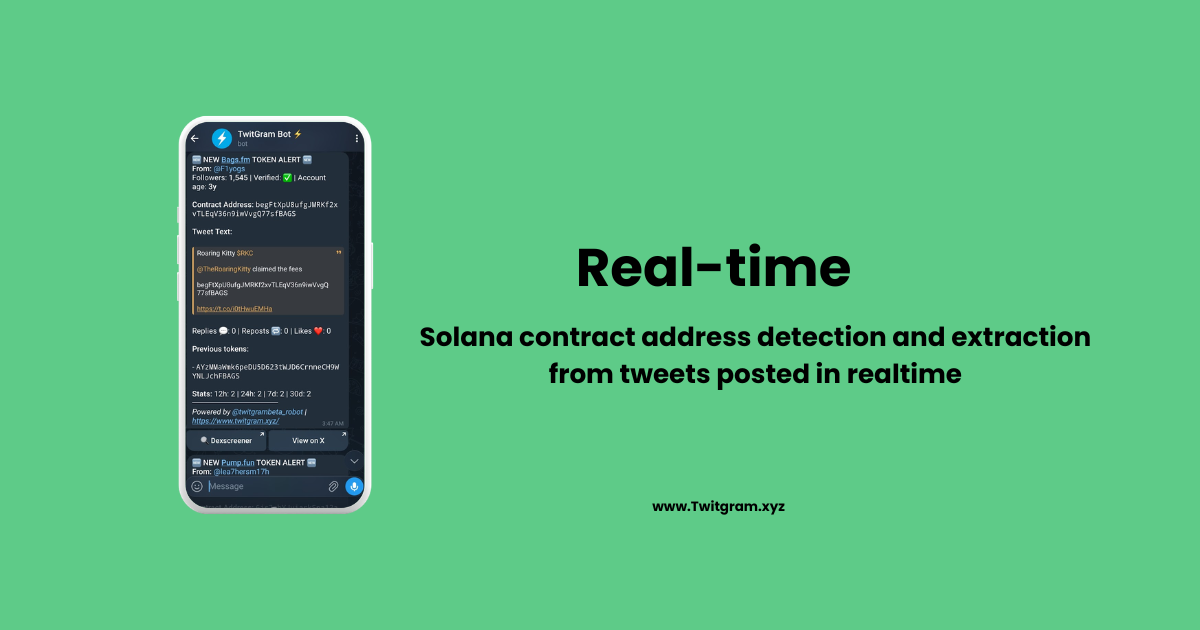
TwitGram CA Streams gives operators a cleaner workflow: real-time Telegram alerts for tweets bearing token contract addresses from supported launch sources, with filters for follower count, account age, verification, 24h tweet history, and a custom blacklist.
This guide shows how to use CA Streams to monitor Solana launch activity without turning your Telegram into another noisy feed.
Why Solana Launch Monitoring Matters
Launchpads Create Speed, but Also Noise
Pump.fun made token creation extremely accessible. Bags.fm adds another launch surface for Solana tokens, including CLI-based launch flows. Other launchpads and launch-style sources continue to compete for attention.
That creates two realities at the same time:
- New token discovery is faster than ever.
- Low-quality token discovery is also faster than ever.
If you try to monitor every new launch directly from launchpad interfaces, scanners, Telegram channels, and X search, you end up with too much raw data and not enough decision structure.
Contract Address Tweets Are an Execution Signal
In crypto, the contract address is often the moment a launch becomes actionable.
A ticker can be vague. A meme can be recycled. A teaser can be bait. A contract address gives you something concrete to verify, chart, blacklist, route to a team, or ignore.
That is why CA monitoring matters. You are not trying to read every launchpad event. You are trying to catch the moments when launch activity becomes visible in the social layer, where traders actually react.
Telegram Is the Right Routing Layer
Most Solana launch decisions already happen in Telegram:
- Private research groups
- Alpha channels
- Trading desk chats
- Bot command workflows
- Team review threads
Sending launch alerts into Telegram removes the tab switching. The CA lands where the team can inspect it, discuss it, and decide whether it belongs in the playbook.
What Solana Launchpad Monitoring Is
Solana launchpad monitoring means watching supported launch sources for token contract address activity and routing matching alerts into a workflow you control.
With TwitGram CA Streams, the focus is not on generic price alerts. It is Twitter/X-based CA detection for launch-related tweets.
TwitGram currently frames CA Streams publicly as six total supported sources: major launchpads such as pump.fun, Bags.fm, Four.meme, Printrr and Pump.tires plus TON chain-wide coverage - all TON ecosystem launchpads are covered. The Solana-side launchpad coverage includes sources such as:
| Source | Use case |
|---|---|
| Pump.fun | High-volume Solana memecoin launches and CA tweets |
| Bags.fm | Solana token launches and Bags ecosystem activity |
| Pump.tires | Additional Solana launchpad-style CA coverage |
| Printr | Publicly positioned as part of the broader launchpad source set |
| Four.meme | Publicly positioned as part of the broader launchpad source set |
The Telegram CA Streams screen itself only shows launchpads enabled at runtime, so the visible in-bot menu may be narrower than the full public source positioning.
How TwitGram CA Streams Work
CA Streams delivers real-time alerts for new tweets bearing token contract addresses from supported launch sources.
Instead of asking you to build launchpad scrapers, connect APIs, or keep refreshing X search, TwitGram turns supported launch-source CA tweets into Telegram alerts.
Core Filters
| Filter | Why it matters |
|---|---|
| Follower count | Suppress low-reputation accounts or focus on higher-reach accounts |
| Account age | Avoid brand-new throwaway accounts when needed |
| Verification | Prioritize verified accounts, if your workflow values that signal |
| 24h tweet history | Reduce spammy repeat posters and high-frequency noise |
| Custom blacklist | Block accounts you already know are low-value or unsafe |
These filters are the difference between a raw feed and an operator workflow. A raw launchpad feed tells you everything. A filtered CA Stream tries to show you the subset worth reviewing.
Alert Destinations
CA Streams can route alerts to Telegram destinations such as:
- Personal DM
- Group
- Channel
- Team workflow destination
For launch monitoring, the best setup is usually not one shared chat for everything. Split alerts by urgency and team role.
How to Set Up Solana Launch Monitoring in TwitGram
Step 1 - Open TwitGram in Telegram
Open @TwitGram_Robot and go to the bot home screen.
CA Streams are available from the Basic tier and above, starting at $25/month.
If your current plan does not support CA Streams, TwitGram will show an upgrade prompt before activation.
Step 2 - Open CA Streams
From the bot home screen, open the CA Streams area.
The screen shows the launchpad streams currently enabled at runtime. Public marketing may describe the full supported-source set, but the Telegram menu only shows streams that are live and available in the bot at that moment.
Step 3 - Choose the Solana Source You Want to Monitor
Start with the source closest to your strategy:
| Strategy | Suggested stream |
|---|---|
| High-volume memecoin scanning | Pump.fun |
| Bags ecosystem monitoring | Bags.fm |
| Broader Solana launch coverage | Pump.tires or other enabled Solana streams |
| Team review workflow | Separate streams by destination |
Do not activate every stream just because it exists. Start with the source you can actually review.
Step 4 - Configure Filters
Set your first filter pass conservatively.
A practical starting setup:
| Filter | Starting point |
|---|---|
| Followers | 500+ or 1K+ if your channel is noisy |
| Account age | 30+ days for stricter quality control |
| Verification | Any, unless your strategy specifically requires verified accounts |
| 24h history | Cap high-frequency posters |
| Blacklist | Add known spam accounts after the first review window |
The first version does not need to be perfect. It needs to be tight enough that the alerts are worth reading.
Step 5 - Attach Alert Destinations
Route each stream to the destination where the alert will be acted on.
Example routing:
| Stream | Destination |
|---|---|
| Pump.fun | High-speed review group |
| Bags.fm | Solana research channel |
| Pump.tires | Lower-priority scan thread |
| High-confidence filtered stream | Personal DM or urgent team channel |
The operator's mistake is routing everything to one group. When all alerts share the same destination, every alert gets treated with the same priority. That defeats the point of filters.
A Practical Solana CA Monitoring Workflow
1) Catch the CA Tweet
The alert lands in Telegram when TwitGram detects a tweet bearing a token contract address from the selected launch source.
Do not treat the alert as a buy signal. Treat it as a review trigger.
2) Verify the Basics
Before acting, check:
- Is the CA correctly formatted?
- Does the source match the expected launchpad?
- Is the tweeting account expected, suspicious, or unknown?
- Is the account newly created?
- Has the same account posted many CAs in the last 24 hours?
- Does the token have matching socials, chart activity, and liquidity context?
CA Streams is the alert layer, not a guarantee layer.
3) Apply Team Triage
A clean Telegram workflow makes triage fast:
| Role | Action |
|---|---|
| Scanner | Checks chart and contract basics |
| Researcher | Checks account history and social context |
| Trader | Decides whether the setup matches the playbook |
| Admin | Updates blacklist and filters after noisy alerts |
Even solo operators can use the same mental model. The point is to separate detection from decision-making.
4) Update Filters Weekly
Solana launch noise changes quickly. Accounts that were useful last week can become spammy this week.
A weekly filter pass should include:
- Add repeat low-quality accounts to the blacklist.
- Raise follower or account-age thresholds if alert volume is too high.
- Lower thresholds only when you are intentionally hunting earlier, riskier signals.
- Split destinations if one channel becomes too noisy.
Common Solana Launch Monitoring Mistakes
Mistake 1 - Treating Every CA as Alpha
A contract address is not alpha by itself. It is a timestamped event that deserves inspection.
The edge comes from seeing the CA quickly, filtering the source, and applying your playbook before the broader market has organized around it.
Mistake 2 - Running Filters Too Loosely
If every low-follower, one-day-old account can trigger your Telegram, you have recreated the noise problem.
Start narrower. You can always loosen the filters later.
Mistake 3 - Ignoring 24h Tweet History
A high-volume CA poster can make a stream unusable. The 24h history filter helps suppress accounts that are producing too many token mentions in a short window.
That is especially useful during high-volume Solana launch cycles.
Mistake 4 - Not Using the Blacklist
The blacklist is not a cleanup feature. It is part of the system.
Every time a bad alert wastes your attention, ask whether that source should be blocked going forward.
Mistake 5 - Sending Every Stream to the Same Chat
A Pump.fun firehose and a higher-conviction Bags.fm review stream should not necessarily land in the same destination.
Route streams based on how quickly and seriously the alert should be reviewed.
Plan Fit: Who Should Use CA Streams
CA Streams are available from Basic tier and above, starting at $25/month.
| User type | Fit |
|---|---|
| Solo Solana trader | Basic can be enough to validate the workflow and route alerts to DM or one group |
| Small team | Standard is cleaner when you need more watchlists, routing, and destination separation |
| Alpha group | Advanced helps when multiple streams and destinations need to run in parallel |
| Larger operation | Enterprise fits broader coverage, more team routing, and higher operational separation |
The important point is not just price. It is workflow capacity.
If you only need one filtered stream into one Telegram destination, start small. If you are running multiple strategies, the routing capacity becomes as important as the stream itself.
Getting Started
A clean first setup looks like this:
- Open @TwitGram_Robot.
- Upgrade to Basic or above if CA Streams are not available on your current plan.
- Open CA Streams.
- Activate one Solana launch source, such as Pump.fun or Bags.fm.
- Set follower count, account age, 24h history, verification, and blacklist filters.
- Route alerts to the Telegram destination where you will review them.
- Review alert quality after 48 hours and tighten filters.
Solana launch monitoring is not about catching everything. It is about catching the right CA tweets fast enough to review them before the crowd turns them into noise.
TwitGram CA Streams gives you that alert layer directly inside Telegram.